Java Utility Using Files.walk()

Scenerio: Suppose you have to move millions of files from archive drive to some other drive after doing some manipulation like zipping some files together and all (this is different utility) with files in this case you want all the file list

Answer: We are going to use Files.walk() cool feature came in Java 8 . No much loops and all just already available methods you have to use thats all .


package com.aem.community.core.servlets;

import org.apache.poi.xssf.usermodel.XSSFRow;
import org.apache.poi.xssf.usermodel.XSSFSheet;
import org.apache.poi.xssf.usermodel.XSSFWorkbook;
import org.apache.sling.api.SlingHttpServletRequest;
import org.apache.sling.api.SlingHttpServletResponse;
import org.apache.sling.api.resource.Resource;
import org.apache.sling.api.servlets.HttpConstants;
import org.apache.sling.api.servlets.SlingSafeMethodsServlet;
import org.json.JSONArray;
import org.json.JSONException;
import org.osgi.framework.Constants;
import org.osgi.service.component.annotations.Component;

import javax.servlet.Servlet;
import javax.servlet.ServletException;
import javax.servlet.ServletOutputStream;
import java.io.File;
import java.io.IOException;
import java.nio.file.Files;
import java.nio.file.Path;
import java.nio.file.Paths;
import java.util.stream.Stream;


@Component(service=Servlet.class,
           property={
                   Constants.SERVICE_DESCRIPTION + "=Simple Demo Servlet",
                   "sling.servlet.methods=" + HttpConstants.METHOD_GET,
                   "sling.servlet.paths="+ "/bin/filenames"

           })
public class FilelistAll extends SlingSafeMethodsServlet {

    private static final long serialVersionUid = 1L;


    @Override
    protected void doGet(final SlingHttpServletRequest req,
                         final SlingHttpServletResponse resp) throws ServletException, IOException {
        final Resource resource = req.getResource();
        String path = "E:\\Proxy_Project\\Morning";
       // File folder = new File(path);
        Stream<Path> files = Files.walk(Paths.get(path));
        Stream<Path> pathStream = files.filter(pathchecking -> pathchecking.toString().endsWith(".pdf") || pathchecking.toString().endsWith(".json"));
        JSONArray pdflist = new JSONArray();

        JSONArray jsonlist = new JSONArray();

        //pathStream.forEach(System.out::println);
        int rowcount = 1;
        pathStream.forEach(

                (i) -> {

                    String unixpath = String.valueOf(i).replace("\\", "/");

                    if (unixpath.endsWith(".pdf")) {

                        // JSONArray pdflist=new JSONArray();
                        //pdflist.put("//"+unixpath);
                        pdflist.put(unixpath);
                    } else if (unixpath.endsWith(".json")) {


                        jsonlist.put(unixpath);
                    }


                    // System.out.println(i);
//                    try {
//                        resp.getWriter().write(String.valueOf(i).replace("\\", "/"));
//                    } catch (IOException e) {
//                        e.printStackTrace();
//                    }

                }


        );

//now we got the list of pdfs and json now put in workbook
        try {
            XSSFWorkbook fileworkbook = new XSSFWorkbook();
            XSSFSheet fileSheet = fileworkbook.createSheet("filelist");
            XSSFRow headingRow = fileSheet.createRow(0);
            headingRow.createCell(0).setCellValue("mainfile");
            headingRow.createCell(1).setCellValue("jsondocument");
            headingRow.createCell(2).setCellValue("htmldocument");

            for (int i = 1; i < pdflist.length(); i++) {

                XSSFRow otherRow = fileSheet.createRow(i);
                otherRow.createCell(0).setCellValue(pdflist.getString(i - 1));

                //just to check if  corresponding metadata file(json  exist or not)
                String jsonpathmaking = pdflist.getString(i - 1).substring(0, pdflist.getString(i - 1).length() - 3);
                String jsonfilepath=jsonpathmaking.concat("json");
                File jsonfile=new File(jsonfilepath);
                if(jsonfile.exists()){

                    otherRow.createCell(1).setCellValue(pdflist.getString(i - 1).substring(0,pdflist.getString(i - 1).length()-3)+"json");
                    otherRow.createCell(2).setCellValue(pdflist.getString(i - 1).substring(0,pdflist.getString(i - 1).length()-3)+"html");
                }
            }


//putting code to write the workbook in stream
            String reportName = "allfiles.xlsx";
            resp.setContentType("application/vnd.openxmlformats-officedocument.spreadsheetml.sheet");
            resp.setHeader("Content-Disposition", "attachment;  filename=" + reportName);
            ServletOutputStream outputStream = null;
            try {
                outputStream = resp.getOutputStream();
            } catch (IOException e) {
                e.printStackTrace();
            }
            fileworkbook.write(outputStream);
            fileworkbook.close();


//            resp.setContentType("text/plain");
//            resp.getWriter().write("Title = " + resource.adaptTo(ValueMap.class).get("jcr:title"));
        } catch (JSONException e) {
            e.printStackTrace();
        }


    }
}

if you want to exclude any particular level directories files ?

It can be in any case suppose that folder acces you dont have or sometines you need that whatever root path you give inside that all subdirectory files only you want to make list not the root level files …supooose myroot(folder name)..in this level two pdf and then inside myroot folder three to 4 directories /subfolder (having files .pdf,.json) so you dont need to consider the files which are on same level of myroot folder ?

How ypu will do that ? Skip you can use

/*
 *  Copyright 2015 Adobe Systems Incorporated
 *
 *  Licensed under the Apache License, Version 2.0 (the "License");
 *  you may not use this file except in compliance with the License.
 *  You may obtain a copy of the License at
 *
 *      http://www.apache.org/licenses/LICENSE-2.0
 *
 *  Unless required by applicable law or agreed to in writing, software
 *  distributed under the License is distributed on an "AS IS" BASIS,
 *  WITHOUT WARRANTIES OR CONDITIONS OF ANY KIND, either express or implied.
 *  See the License for the specific language governing permissions and
 *  limitations under the License.
 */
package com.aem.community.core.servlets;

import org.apache.poi.xssf.usermodel.XSSFRow;
import org.apache.poi.xssf.usermodel.XSSFSheet;
import org.apache.poi.xssf.usermodel.XSSFWorkbook;
import org.apache.sling.api.SlingHttpServletRequest;
import org.apache.sling.api.SlingHttpServletResponse;
import org.apache.sling.api.resource.Resource;
import org.apache.sling.api.servlets.HttpConstants;
import org.apache.sling.api.servlets.SlingSafeMethodsServlet;
import org.json.JSONArray;
import org.json.JSONException;
import org.osgi.framework.Constants;
import org.osgi.service.component.annotations.Component;

import javax.servlet.Servlet;
import javax.servlet.ServletException;
import javax.servlet.ServletOutputStream;
import java.io.File;
import java.io.IOException;
import java.nio.file.Files;
import java.nio.file.Path;
import java.nio.file.Paths;
import java.util.stream.Stream;


@Component(service=Servlet.class,
           property={
                   Constants.SERVICE_DESCRIPTION + "=Simple Demo Servlet",
                   "sling.servlet.methods=" + HttpConstants.METHOD_GET,
                   "sling.servlet.paths="+ "/bin/filenames"

           })
public class FilelistAll extends SlingSafeMethodsServlet {

    private static final long serialVersionUid = 1L;


    @Override
    protected void doGet(final SlingHttpServletRequest req,
                         final SlingHttpServletResponse resp) throws ServletException, IOException {
        final Resource resource = req.getResource();
        //String path = "E:\\any_Project\\Morning";

        String path=req.getParameter("pathName");
       // File folder = new File(path);
        Stream<Path> files = Files.walk(Paths.get(path));

               // Predicate <String> predicate = element -> element.startsWith("P");
        //long count = colours.stream().filter(predicate).count();

        Stream<Path> pathStream = files.filter(pathchecking -> pathchecking.toString().endsWith(".pdf") );

        //Stream<Path> filesSecond = Files.walk(Paths.get(path));
        Stream<Path> skip = pathStream.skip(Files.walk(Paths.get(path), 1).filter(pathchekingagain -> pathchekingagain.toString().endsWith(".pdf")).count());

        JSONArray pdflist = new JSONArray();

        JSONArray jsonlist = new JSONArray();

        //pathStream.forEach(System.out::println);
        int rowcount = 1;
        //pathStream.forEach(
        skip.forEach(
                (i) -> {

                    String unixpath = String.valueOf(i).replace("\\", "/");

                    if (unixpath.endsWith(".pdf")) {

                        // JSONArray pdflist=new JSONArray();
                        //pdflist.put("//"+unixpath);
                        pdflist.put(unixpath);
                    }
//                    else if (unixpath.endsWith(".json")) {
//
//
//                        jsonlist.put(unixpath);
//                    }


                    // System.out.println(i);
//                    try {
//                        resp.getWriter().write(String.valueOf(i).replace("\\", "/"));
//                    } catch (IOException e) {
//                        e.printStackTrace();
//                    }

                }


        );

//now we got the list of pdfs and json now put in workbook
        try {
            XSSFWorkbook fileworkbook = new XSSFWorkbook();
            XSSFSheet fileSheet = fileworkbook.createSheet("filelist");
            XSSFRow headingRow = fileSheet.createRow(0);
            headingRow.createCell(0).setCellValue("mainfile");
            headingRow.createCell(1).setCellValue("jsondocument");
            headingRow.createCell(2).setCellValue("htmldocument");

            for (int i = 1; i < pdflist.length(); i++) {

                XSSFRow otherRow = fileSheet.createRow(i);
                otherRow.createCell(0).setCellValue(pdflist.getString(i - 1));

                //just to check if  corresponding metadata file(json  exist or not)
                String jsonpathmaking = pdflist.getString(i - 1).substring(0, pdflist.getString(i - 1).length() - 3);
                String jsonfilepath=jsonpathmaking.concat("json");
                File jsonfile=new File(jsonfilepath);
                if(jsonfile.exists()){

                    otherRow.createCell(1).setCellValue(pdflist.getString(i - 1).substring(0,pdflist.getString(i - 1).length()-3)+"json");
                    otherRow.createCell(2).setCellValue(pdflist.getString(i - 1).substring(0,pdflist.getString(i - 1).length()-3)+"html");
                }
            }


//putting code to write the workbook in stream
            String reportName = "allfiles.xlsx";
            resp.setContentType("application/vnd.openxmlformats-officedocument.spreadsheetml.sheet");
            resp.setHeader("Content-Disposition", "attachment;  filename=" + reportName);
            ServletOutputStream outputStream = null;
            try {
                outputStream = resp.getOutputStream();
            } catch (IOException e) {
                e.printStackTrace();
            }
            fileworkbook.write(outputStream);
            fileworkbook.close();


//            resp.setContentType("text/plain");
//            resp.getWriter().write("Title = " + resource.adaptTo(ValueMap.class).get("jcr:title"));
        } catch (JSONException e) {
            e.printStackTrace();
        }


    }
}

Zipping the files utility

package com.aem.community.core.servlets;


import org.apache.sling.api.SlingHttpServletRequest;
import org.apache.sling.api.SlingHttpServletResponse;
import org.apache.sling.api.resource.*;
import org.apache.sling.api.servlets.HttpConstants;
import org.apache.sling.api.servlets.SlingSafeMethodsServlet;
import org.json.JSONException;
import org.osgi.framework.Constants;
import org.osgi.service.component.annotations.Component;
import org.osgi.service.component.annotations.Reference;

import javax.jcr.Session;
import javax.servlet.Servlet;
import javax.servlet.ServletException;
import javax.xml.bind.JAXBContext;
import javax.xml.bind.JAXBException;
import javax.xml.bind.Marshaller;
import java.io.*;
import java.util.HashMap;
import java.util.Map;
import java.util.zip.ZipEntry;
import java.util.zip.ZipOutputStream;

import org.json.JSONObject;

import static com.day.cq.wcm.foundation.List.log;


@Component(service= Servlet.class,
            property={
                    Constants.SERVICE_DESCRIPTION + "=Simple Demo Servlet",
                    "sling.servlet.methods=" + HttpConstants.METHOD_GET,
                    "sling.servlet.paths="+ "/bin/zippingdocx"

            })
    public class ZippingUtility extends SlingSafeMethodsServlet {

    private static final long serialVersionUid = 1L;

    @Reference
    private ResourceResolverFactory resolverFactory;

    private Session session;
    private ResourceResolver resolver = null;

    @Override
    protected void doGet(final SlingHttpServletRequest req, final SlingHttpServletResponse resp) throws ServletException, IOException {
        try {

            Map<String, Object> params = new HashMap<>();
            params.put(ResourceResolverFactory.SUBSERVICE, "customreporting");
            resolver = resolverFactory.getServiceResourceResolver(params);
            log.info("user id -------->" + resolver.getUserID());
            session = resolver.adaptTo(Session.class);
            log.info("Session created");

            //Reading the JSON file
            StringBuilder stringBuilder = new StringBuilder();
            readingJsonFile(stringBuilder);
            //converting json string into jsonobject
            JSONObject alljsonvalues = new JSONObject(stringBuilder.toString());

            //starting the xml creation
            try {
                Morgan3DR morgan3DR=new Morgan3DR();

                //setting the values in morgan 3dr class
                morgan3drclassSetter(morgan3DR,alljsonvalues);

            //Create JAXB Context
            JAXBContext jaxbContext = JAXBContext.newInstance(Morgan3DR.class);

            //Create Marshaller
            Marshaller jaxbMarshaller = null;

            jaxbMarshaller = jaxbContext.createMarshaller();


            //Required formatting??
            jaxbMarshaller.setProperty(Marshaller.JAXB_FORMATTED_OUTPUT, Boolean.TRUE);

            //Print XML String to Console
            StringWriter stringWriter = new StringWriter();

            //Write XML to StringWriter
            jaxbMarshaller.marshal(morgan3DR, stringWriter);

            //Verify XML Content
            String xmlContent = stringWriter.toString();


            //converting pdf into bytes

                File file=new File("C:\\Users\\Amit\\Desktop\\Morgan_3dr\\payslip_jan_capgemini.pdf");
//                byte[] bytesOfPdf;
//                bytesOfPdf = new byte[(int) file.length()];
                ByteArrayOutputStream byteArrayOutputStream=new ByteArrayOutputStream();
                convertPdftobyte(byteArrayOutputStream);

                //now convert the vytesarray into byte and put in zip


            //zippping the files

                zipthexml(xmlContent,byteArrayOutputStream);


            log.info("xml values in string-------->"+xmlContent);
            } catch (JAXBException e) {
                e.printStackTrace();
            }


            resp.getWriter().write(" ------stringBuilder.toString()-----" + stringBuilder.toString());
            //we got all json as a full string --need to change in jssonobject


        } catch (LoginException | JSONException e) {
            e.printStackTrace();
        }
    }

    private ByteArrayOutputStream convertPdftobyte(ByteArrayOutputStream byteArrayOutputStream) {
       // File file = new File("C:\\Users\\Amit\\Desktop\\Morgan_3dr\\payslip_jan_capgemini.pdf");
        try {
            FileInputStream fileInputStream =new FileInputStream("C:\\Users\\Amit\\Desktop\\Morgan_3dr\\payslip_jan_capgemini.pdf");
            //ByteArrayOutputStream byteArrayOutputStream=new ByteArrayOutputStream();
            byte[] buf = new byte[1024];
            for (int readNum; (readNum = fileInputStream.read(buf)) != -1;) {
                byteArrayOutputStream.write(buf, 0, readNum); //no doubt here is 0
                //Writes len bytes from the specified byte array starting at offset off to this byte array output stream.

            }

            fileInputStream.close();
//             bytesOfPdf = byteArrayOutputStream.toByteArray();
//             byteArrayOutputStream.close();

        } catch (FileNotFoundException e) {
            e.printStackTrace();
        } catch (IOException e) {
            e.printStackTrace();
        }
        return byteArrayOutputStream;
    }

    private void zipthexml(String xmlContent, ByteArrayOutputStream bytesOfPdf) {
        try {
            FileOutputStream fileOutputStream=new FileOutputStream("C:\\Users\\Amit\\Desktop\\Morgan_3dr\\zipfilelocation\\morganzipfile.zip");
            ZipOutputStream zipOutputStream= new ZipOutputStream(fileOutputStream);
            try {
                zipOutputStream.putNextEntry(new ZipEntry("morgan.xml"));

               byte[] bytes = xmlContent.getBytes();
                zipOutputStream.write(bytes);
                zipOutputStream.closeEntry();


                zipOutputStream.putNextEntry(new ZipEntry("3dr.txt"));
                byte[] bytess = "kuch bhi ho rha hai".getBytes();
                zipOutputStream.write(bytess);
                zipOutputStream.closeEntry();

                zipOutputStream.putNextEntry(new ZipEntry("other.pdf"));
                zipOutputStream.write(bytesOfPdf.toByteArray());
                zipOutputStream.closeEntry();


                zipOutputStream.close();
                fileOutputStream.close();


            } catch (IOException e) {
                e.printStackTrace();
            }
        } catch (FileNotFoundException e) {
            e.printStackTrace();
        }
    }

    private void morgan3drclassSetter(Morgan3DR morgan3DR, JSONObject alljsonvalues) {

        try {
            morgan3DR.setTitle(alljsonvalues.getString("content/wm3dr/zz-title"));
            morgan3DR.setAuthentication_name(alljsonvalues.getString("conten/public/global/authentication_name"));
            morgan3DR.setClassification(alljsonvalues.getString("content/wm3dr/content/classification"));
            morgan3DR.setLanguague(alljsonvalues.getString("content/template_metadata/Languague"));
            morgan3DR.setLdapUserName(alljsonvalues.getString("content/wm3dr/ldap_user_name"));
            morgan3DR.setProductId("3DR");
            morgan3DR.setPublish_date(alljsonvalues.getString("content/wm3dr/publish_date"));
            morgan3DR.setShort_description(alljsonvalues.getString("content/wm3dr/Short_description"));
            morgan3DR.setSomething_1(alljsonvalues.getString("content/wm3dr/something_1"));
            morgan3DR.setSomething_2(alljsonvalues.getString("content/wm3dr/something_2"));
        } catch (JSONException e) {
            e.printStackTrace();
        }
    }

    private String readingJsonFile(StringBuilder stringBuilder) {
        try {
            File file = new File("C:\\Users\\Amit\\Desktop\\Morgan_3dr\\sample_3DR.json");
            BufferedReader bufferedReader = new BufferedReader(new FileReader(file));

            String linestring = null;

            linestring = bufferedReader.readLine();

            while (linestring != null) {

                stringBuilder.append(linestring);
                linestring = bufferedReader.readLine();
            }


        } catch (IOException e) {
            e.printStackTrace();
        }
        return stringBuilder.toString();
    }

}//class ends


Servlet for Excel reporting

package com.aem.community.core.servlets;

//import org.apache.felix.scr.annotations.Reference;

import org.apache.sling.api.SlingHttpServletRequest;
import org.apache.sling.api.SlingHttpServletResponse;
import org.apache.sling.api.resource.*;
import org.apache.sling.api.servlets.SlingAllMethodsServlet;
import org.apache.sling.commons.json.JSONArray;
import org.apache.sling.commons.json.JSONException;
import org.apache.sling.commons.json.JSONObject;
import org.osgi.framework.Constants;
import org.osgi.service.component.annotations.Component;
import org.osgi.service.component.annotations.Reference;
import org.slf4j.Logger;
import org.slf4j.LoggerFactory;

import javax.jcr.RepositoryException;
import javax.jcr.Session;
import javax.servlet.Servlet;
import javax.servlet.ServletException;
import javax.servlet.ServletOutputStream;
import java.io.IOException;
import java.util.Iterator;

import org.apache.poi.ss.usermodel.Cell;
import org.apache.poi.ss.usermodel.Row;
import org.apache.poi.xssf.usermodel.XSSFWorkbook;
import org.apache.poi.ss.usermodel.Sheet;
import org.apache.poi.ss.usermodel.Workbook;

// @SlingServlet(paths = "/bin/commentexcelreporting")

@Component(service= Servlet.class,
        property={
                Constants.SERVICE_DESCRIPTION + "=custom reporting servlet",
                "sling.servlet.paths="+ "/bin/commentexcelreporting"

        })
public class CommentReporting  extends SlingAllMethodsServlet {
    @Reference
    ResourceResolverFactory resourceResolverFactory;
    Logger logger = LoggerFactory.getLogger(CommentReporting.class);
    //static  int storecount=0;
    int storecount=0;

    @Override
    public void doGet(final SlingHttpServletRequest request, final SlingHttpServletResponse response) throws ServletException, IOException {
        //This is for admin session
        ResourceResolver resourceResolver = null;
        resourceResolver=  request.getResourceResolver();
        logger.info("Resolved user: " + resourceResolver.getUserID());


        //  this is for system user session............ creating session from resource resolver factory
//            Map<String, Object> usermap = new HashMap<String, Object>();
//            usermap.put(ResourceResolverFactory.SUBSERVICE, "customreporting");
//            ResourceResolver resourceResolver = null;
//            try {
//               // resourceResolver = resourceResolverFactory.getResourceResolver(usermap);
//               resourceResolver = resourceResolverFactory.getServiceResourceResolver(usermap);
//                logger.info("Resolved user: " + resourceResolver.getUserID());
//            } catch (LoginException e) {
//                e.printStackTrace();
//            }

        String[] headerlist = {"Commenter Name / ID", "Commenter Title", "Commenter Email Address", " Comment Type", " Document Title / Version"};

        //Uncomment below for hitting the servlet path directly and replace all
        //String varWorkflowPathHardcoded = "http://localhost:4508/libs/fmdita/review/inlinereview.html?wId=/var/workflow/instances/server1/2019-10-21/ReviewDITAMAP_64&idx=0&filterData=%5B%5B0%5D%2C%5B0%5D%2C%5B0%5D%5D";


        String varworkflowpathfromjs = request.getParameter("presenturl");
        logger.info("this is value coming from js "+varworkflowpathfromjs);

        if(varworkflowpathfromjs.contains("idx")) {
            Session session = resourceResolver.adaptTo(Session.class);
            JSONArray jsonArray = new JSONArray();
            //  int storecount = 0;
            int storecount = this.storecount;
            forParticularTopicsJson(varworkflowpathfromjs,resourceResolver,jsonArray, storecount,session);


//Apache poi started

            Workbook workbook = new XSSFWorkbook();
            // logger.info("after coming from method "+ CommentReporting.storecount);
            logger.info("after coming from method "+this.storecount);
            logger.info("withoutv this  coming from method "+storecount);
            // excelCreation(workbook,headerlist, CommentReporting.storecount,jsonArray);
            excelCreation(workbook,headerlist,this.storecount,jsonArray);
            //below code is for downloadable excel file on button click AJAX
            responseConfig(response,workbook);
            try {
                session.save();
            } catch (RepositoryException e) {
                e.printStackTrace();
            }

        }//if url  contains id

        //else condition started for " url does not contain id" ---> this can happen when one topic only is there
        // or if user is at parent page of map (havent selected any topic to edit)


        else {

            String commentInfopathRemoveWcmmode=null;
            String commentInfopath=null;

            Session session = resourceResolver.adaptTo(Session.class);
            //  String varworkflowpath = "/var/workflow/instances/server1/2019-10-23/ReviewDITAMAP_12";
            //http://localhost:4508/libs/fmdita/review/inlinereview.html?wId=/var/workflow/instances/server1/2019-10-28/ReviewDITAMAP_11&wcmmode=disabled
            boolean wcmmode = varworkflowpathfromjs.contains("wcmmode");

            if(wcmmode) {
                commentInfopathRemoveWcmmode = varworkflowpathfromjs.substring(varworkflowpathfromjs.indexOf("wId=") + 4, varworkflowpathfromjs.indexOf("&wcmmode"));
                logger.info("path wich contains wcmmode,after substring the wcmmode from url"+commentInfopathRemoveWcmmode);
            }
            else {
                commentInfopath = varworkflowpathfromjs.substring(varworkflowpathfromjs.indexOf("wId=") + 4);
                logger.info("path which does not contain wcmmode,no need of  substring the wcmmode from url"+commentInfopath);
            }

            Resource varwokflownode = resourceResolver.getResource(wcmmode?commentInfopathRemoveWcmmode:commentInfopath);
            JSONArray jsonArray = new JSONArray();

            Resource metaData = varwokflownode.getChild("metaData");

            Resource events = metaData.getChild("events");
            int eventsChildNodeCount = 0;
            Iterator<Resource> eventsResourceIterator = events.listChildren();
            int count = 0;
            while (eventsResourceIterator.hasNext()) {
                Resource eventChildResource = eventsResourceIterator.next();
                logger.info("this is the node which needs to ftech" + eventChildResource.getName());
                Resource respectiveTopicNode = events.getChild(eventChildResource.getName());
                //    int count = 0;
                logger.info("0 1 2 3 topics nodesssss name " + eventChildResource.getName());
                Iterator<Resource> resourceIterator = respectiveTopicNode.listChildren();
                // while (resourceIterator.hasNext()) {

//            Resource zero = events.getChild("0");
//            int count = 0;
//            Iterator<Resource> resourceIterator = zero.listChildren();
                while (resourceIterator.hasNext()) {

                    JSONObject jsonObject = new JSONObject();

                    try {


                        Resource eventRes = resourceIterator.next();
                        ValueMap valueMap = eventRes.adaptTo(ValueMap.class);
                        String comment = valueMap.get("comment", String.class);
                        jsonObject.put("comment", comment);
                        String commentId = valueMap.get("commentId", String.class);
                        jsonObject.put("commentId", commentId);
                        String user = valueMap.get("user", String.class);
                        jsonObject.put("user", user);
                        String version = valueMap.get("version", String.class);
                        jsonObject.put("version", version);

                    } catch (JSONException e) {
                        e.printStackTrace();
                    }

                    jsonArray.put(jsonObject);


                    count++;

                }//while loop ended
                logger.info("count is " + count);

                //response.getWriter().print("anything");
                // response.getWriter().print(jsonArray);


            }//parent while loop ended
//apache poi started
            Workbook workbook = new XSSFWorkbook();
            excelCreation(workbook,headerlist,count,jsonArray);
            //below code is for downloadable excel file on button click AJAX
            responseConfig(response,workbook);


//            String reportName = "customisedCommentReport.xlsx";
//            response.setContentType("application/vnd.openxmlformats-officedocument.spreadsheetml.sheet");
//            response.setHeader("Content-Disposition", "attachment;  filename=" + reportName);
//            ServletOutputStream outputStream = response.getOutputStream();
//            workbook.write(outputStream);
//            workbook.close();

            try {
                session.save();
            } catch (RepositoryException e) {
                e.printStackTrace();
            }


        }//else ended


    }//doget ends


    //different methods...

    private void  forParticularTopicsJson(String varworkflowpathfromjs, ResourceResolver resourceResolver, JSONArray jsonArray, int storecount, Session session) {

        logger.info("id is contained in url or not" + varworkflowpathfromjs.contains("idx"));

        int n = varworkflowpathfromjs.indexOf("idx");
        String id = varworkflowpathfromjs.substring(n + 4, n + 5);
        logger.info("trying to fetcch the id  " + id);
        // Session session = resourceResolver.adaptTo(Session.class);

        //write the code to get this ---->varwokflownode==/var/workflow/instances/server0/2019-10-10_1/ReviewDITAMAP_37
        String commentInfopath = varworkflowpathfromjs.substring(varworkflowpathfromjs.indexOf("wId=") + 4, varworkflowpathfromjs.indexOf("&idx"));
        logger.info("this is actual path node of var" + commentInfopath);

        Resource varwokflownode = resourceResolver.getResource(commentInfopath);
        // JSONArray jsonArray = new JSONArray();

        Resource metaData = varwokflownode.getChild("metaData");

        Resource events = metaData.getChild("events");
        int eventsChildNodeCount = 0;
        Iterator<Resource> eventsResourceIterator = events.listChildren();
        int count = 0;
        while (eventsResourceIterator.hasNext()) {
            Resource eventChildResource = eventsResourceIterator.next();
            logger.info("this is the node which needs to ftech" + eventChildResource.getName());

            if (eventChildResource.getName().equals(id)) {
                logger.info("this is the node which needs to ftech" + eventChildResource.getName().equals(id));
                // }
                //}


                Resource respectiveTopicNode = events.getChild(id);
                //    int count = 0;
                logger.info("0 1 2 3 topics nodesssss name " + eventChildResource.getName());
                Iterator<Resource> resourceIterator = respectiveTopicNode.listChildren();
                while (resourceIterator.hasNext()) {

                    JSONObject jsonObject = new JSONObject();

                    try {


                        Resource eventRes = resourceIterator.next();
                        logger.info("0 1 2 3 topics nodesssss name " + eventRes.getName());
                        ValueMap valueMap = eventRes.adaptTo(ValueMap.class);
                        String comment = valueMap.get("comment", String.class);
                        logger.info("comment is this ---> " + comment);
                        jsonObject.put("comment", comment);
                        String commentId = valueMap.get("commentId", String.class);
                        jsonObject.put("commentId", commentId);
                        String user = valueMap.get("user", String.class);
                        jsonObject.put("user", user);
                        String version = valueMap.get("version", String.class);
                        jsonObject.put("version", version);
                        logger.info("jsonobject----> " + jsonObject);

                    } catch (JSONException e) {
                        e.printStackTrace();
                    }

                    jsonArray.put(jsonObject);
                    logger.info("jsonarray---> " + jsonArray);

                    count++;

                }//while loop ended


                logger.info("count is " + count);
                this.storecount=count;
                //below give actual number
                logger.info("storecountcount is " +this.storecount);

            }
        }//while and if loop parent one ended
        logger.info("storecountcount is " + storecount);
//return storecount;
    }


    private void responseConfig(SlingHttpServletResponse response, Workbook workbook) throws IOException {

        String reportName = "customisedCommentReport.xlsx";
        response.setContentType("application/vnd.openxmlformats-officedocument.spreadsheetml.sheet");
        response.setHeader("Content-Disposition", "attachment;  filename=" + reportName);
        ServletOutputStream outputStream = null;
        try {
            outputStream = response.getOutputStream();
        } catch (IOException e) {
            e.printStackTrace();
        }
        workbook.write(outputStream);
        workbook.close();
    }

    private void excelCreation(Workbook workbook, String[] headerlist, int count, JSONArray jsonArray) {


        // Workbook workbook = new XSSFWorkbook();
        Sheet planetsheet = workbook.createSheet("commentreport");
        Row headerrow = planetsheet.createRow(0);
        for (int i = 0; i < headerlist.length; i++) {

            Cell cell = headerrow.createCell(i);
            cell.setCellValue(headerlist[i]);

        }

        for (int m = 0; m < count + 1; m++) {
            Row otherRows = planetsheet.createRow(m + 1);
            Cell cellOne = otherRows.createCell(0);
            try {

                cellOne.setCellValue(jsonArray.getJSONObject(m).get("comment").toString());
                Cell cellTwo = otherRows.createCell(1);
                cellTwo.setCellValue(jsonArray.getJSONObject(m).get("commentId").toString());
                Cell cellThree = otherRows.createCell(2);
                cellThree.setCellValue(jsonArray.getJSONObject(m).get("comment").toString());
                Cell cellfourth = otherRows.createCell(3);
                cellfourth.setCellValue(jsonArray.getJSONObject(m).get("user").toString());
                Cell cellfifth = otherRows.createCell(4);
                cellfifth.setCellValue(jsonArray.getJSONObject(m).get("version").toString());
            } catch (JSONException e) {
                e.printStackTrace();
            }
        }
    }
}//class ends

Reading from URL (GSON)

Sometimes in AEM there can be scenerio where you have to read from 3rd api/url and that data can be used as a dropdown or may be used in your front end sites .

we have to cretae three classes mentioned below .last two classes is just for deserialization of Json.

  • Apireading.java
  • UniverseBean.java
  • Results.java

I have used this “https://swapi.co/api/planets/ url ,which is in json format here I am fetching the data from that url and then converting this json into java object .

code goes like that:

Apireading.java

package amitsample.core.models;
 
import com.google.gson.Gson;
import org.apache.sling.api.resource.Resource;
import org.apache.sling.models.annotations.Model;
import javax.annotation.PostConstruct;
import javax.net.ssl.HttpsURLConnection;
import java.io.BufferedReader;
import java.io.InputStream;
import java.io.InputStreamReader;
import java.net.URL;
import java.util.ArrayList;
import java.util.List;
 
@Model(adaptables= Resource.class)
 
public class Apireading {
 
    private String finalstring= new String();
    private List<String>planetnamelist;
    private ArrayList<String> residentslist;
    private Results resultsObj;
    private ArrayList<Results> resultsObjlist=new  ArrayList<Results>() ;
 
 
    @PostConstruct
    public void activate() throws Exception {
 
 
        URL url=new URL("https://swapi.co/api/planets/");
        HttpsURLConnection httpsURLConnection = (HttpsURLConnection) url.openConnection();
        httpsURLConnection.setRequestProperty("Accept", "*/*");
        httpsURLConnection.setRequestProperty("user-agent", "Mozilla/5.0 (Windows NT 10.0; Win64; x64) AppleWebKit/537.36 (KHTML, like Gecko) Chrome/76.0.3809.100 Safari/537.36");
        InputStream is=httpsURLConnection.getInputStream();
        InputStreamReader isr=new InputStreamReader (is);
        BufferedReader br = new BufferedReader(isr);
        StringBuilder str=new StringBuilder();
        String line =null;
 
        line=br.readLine();//first time read
         while (line != null){
             str .append(line);//Line will always have something never become null ,but Bufferreader become null after reading the whole so now if we read it again it will be null
             line=br.readLine();//second time reading from bufferreader now bufferreader wont be having any value it would be null
 
        }
 
         finalstring=str.toString();
 
//Dserialization of json
 
        Gson gson=new Gson();
        UniverseBean universeBean=gson.fromJson(finalstring,UniverseBean.class);
       // Results[] results = universeBean.getResults();
        List<Results> results = universeBean.getResults();
        planetnamelist=new ArrayList<String>();
        residentslist=new ArrayList<String>();
        planetnamemethod(results,planetnamelist,residentslist);
 
    }
 
 
    private void planetnamemethod(List<Results> results, List<String> planetnamelist, ArrayList<String> residentslist) {
 
        for (int i=0;i<results.size();i++){
            resultsObj=new Results();
            resultsObj.setName(results.get(i).getName());
            resultsObj.setResidents(results.get(i).getResidents());
            resultsObjlist.add(resultsObj);
 
        }
 
    }
 
 
    public String getFinalstring() {
        return finalstring;
    }
 
    public List<String> getPlanetnamelist() {
        return planetnamelist;
    }
 
    public ArrayList<String> getResidentslist() {
        return residentslist;
    }
 
    public Results getResultsObj() {
        return resultsObj;
    }
 
    public ArrayList<Results> getResultsObjlist() {
        return resultsObjlist;
    }
  
}

UniverseBean.java

package amitsample.core.models;

import com.google.gson.annotations.SerializedName;

import java.util.List;

public class UniverseBean {
    @SerializedName(value = "count")
     private int count;

    @SerializedName(value = "next")
    private String next;

    @SerializedName(value = "previous")
    private String previous;


//    @SerializedName(value = "results")
//    private Results[] results;
//above and below both are correct in context of json  but developer mainly prefer to use list as it has more methods
    @SerializedName(value = "results")
    private List<Results> results;

    public int getCount() {
        return count;
    }

    public void setCount(int count) {
        this.count = count;
    }

    public String getNext() {
        return next;
    }

    public void setNext(String next) {
        this.next = next;
    }

    public String getPrevious() {
        return previous;
    }

    public void setPrevious(String previous) {
        this.previous = previous;
    }

    public List<Results> getResults() {
        return results;
    }

    public void setResults(List<Results> results) {
        this.results = results;
    }
}

Results.java

package amitsample.core.models;
 
import com.google.gson.annotations.SerializedName;
 
import java.util.ArrayList;
import java.util.List;
 
public class Results {
    @SerializedName(value = "name")
    private String name;
    @SerializedName(value = "rotation_period")
    private String rotation_period;
    @SerializedName(value = "orbital_period")
    private String orbital_period;
    @SerializedName(value = "diameter")
    private String diameter;
    @SerializedName(value = "climate")
    private String climate;
    @SerializedName(value = "gravity")
    private String gravity;
    @SerializedName(value = "terrain")
    private String terrain;
    @SerializedName(value = "surface_water")
    private String surface_water;
    @SerializedName(value = "population")
    private String population;
//    @SerializedName(value = "residents")
//    private String[] residents;
        @SerializedName(value = "residents")
         private ArrayList<String> residents;
 
    @SerializedName(value = "films")
    private String[] films;
    @SerializedName(value = "created")
    private String created;
    @SerializedName(value = "edited")
    private String edited;
    @SerializedName(value = "url")
    private String url;
 
 
    public String getName() {
        return name;
    }
 
    public void setName(String name) {
        this.name = name;
    }
 
    public String getRotation_period() {
        return rotation_period;
    }
 
    public void setRotation_period(String rotation_period) {
        this.rotation_period = rotation_period;
    }
 
    public String getOrbital_period() {
        return orbital_period;
    }
 
    public void setOrbital_period(String orbital_period) {
        this.orbital_period = orbital_period;
    }
 
    public String getDiameter() {
        return diameter;
    }
 
    public void setDiameter(String diameter) {
        this.diameter = diameter;
    }
 
    public String getClimate() {
        return climate;
    }
 
    public void setClimate(String climate) {
        this.climate = climate;
    }
 
    public String getGravity() {
        return gravity;
    }
 
    public void setGravity(String gravity) {
        this.gravity = gravity;
    }
 
    public String getTerrain() {
        return terrain;
    }
 
    public void setTerrain(String terrain) {
        this.terrain = terrain;
    }
 
    public String getSurface_water() {
        return surface_water;
    }
 
    public void setSurface_water(String surface_water) {
        this.surface_water = surface_water;
    }
 
    public String getPopulation() {
        return population;
    }
 
    public void setPopulation(String population) {
        this.population = population;
    }
 
    public ArrayList<String> getResidents() {
        return residents;
    }
 
    public void setResidents(ArrayList<String> residents) {
        this.residents = residents;
    }
 
    public String[] getFilms() {
        return films;
    }
 
    public void setFilms(String[] films) {
        this.films = films;
    }
 
    public String getCreated() {
        return created;
    }
 
    public void setCreated(String created) {
        this.created = created;
    }
 
    public String getEdited() {
        return edited;
    }
 
    public void setEdited(String edited) {
        this.edited = edited;
    }
 
    public String getUrl() {
        return url;
    }
 
    public void setUrl(String url) {
        this.url = url;
    }
}

Now in sightly I have just used and the Apireading model class and and just printed over my browser:

Sightly

<div data-sly-use.search="amitsample.core.models.Apireading">

<b><u><h1 style="color:green">list of planets and their residents =======>>>>>    </h1></u></b>
<ol style="list-style-type:square;" data-sly-list.resultobj=${search.resultsObjlist}>

   <li style="color:red">
       <h2>Planet${resultobjList.index}</h2> <h3>${resultobj.name}</h3>

     <h2>Residentslist of Planet ${resultobjList.index}</h2> 

     <ol data-sly-list=${resultobj.residents}><li>${item}</li></ol>

   </li>
</ol>


</div>

How it will look on page

Share this:

EditReading from url(Gson)

Leave a comment

AmitPandeyblogBlog at WordPress.com.

Reading multifield dialog json

In AEM we use multifield dialog very often and oftenly we get into the situation where we have to read these stored multifield values.here in this post I will explain how you can read the multifield dialog values

when multifield value is being stored as json like below:

from google archive

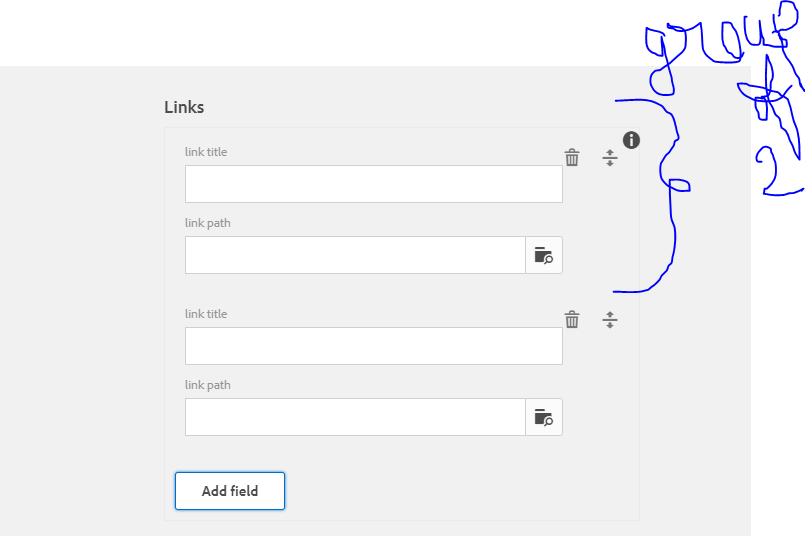
Dilaog would look similar like that..here I used two type( textfield –link title and path browser –> link path ) inside a multifield It can be group of three or 4 items in a multifiled

If you have multifield in desgin dailog you can acces like this :

RResource resourceobject =currentDesign.getDesign(currentPage).getContentResource().getChild("node-name");

here I am directly using path which is not correct way of doing but but here I am focusing on logic of retrieving json values and accessing it to HTL(sightly)

code will go like that


package amitsample.core.models;
import org.apache.jackrabbit.oak.commons.json.JsonObject;
import org.apache.sling.api.resource.Resource;
import org.apache.sling.api.resource.ResourceResolver;
import org.apache.sling.api.resource.ResourceResolverFactory;
import org.apache.sling.api.resource.ValueMap;
import org.apache.sling.commons.json.JSONObject;
import org.apache.sling.models.annotations.Default;
import org.apache.sling.models.annotations.Model;
import org.apache.sling.settings.SlingSettingsService;
import javax.annotation.PostConstruct;
 import javax.inject.Inject;
 import javax.inject.Named;
 import java.security.PrivateKey;
 import java.util.*;
@Model(adaptables= Resource.class)

public class Jsonreadingpart {
 @Inject
 private SlingSettingsService settings;

@Inject @Named("sling:resourceType") @Default(values="No resourceType")
protected String resourceType;

private String path="/content/mypage2/jcr:content/par123/multifieldtest";

@Inject
private ResourceResolverFactory resourceresolverfactory;

@Inject
private ResourceResolver resourceresolver;

private List<Map<String,String>>results;

private Retrievehasmap retrievehasmapobject;

private List<Retrievehasmap> ls;

@PostConstruct
public void activate() throws Exception{
    Resource resource=resourceresolver.getResource(path);
    ValueMap map=resource.adaptTo(ValueMap.class);
    String[] values=map.get("links", String[].class);
//above line will store all multifield values 
    results = new ArrayList<Map<String, String>>();
//        for (String value:values){

/*now need to start the loop for each value suppose in first iteration you got this string {"title":"amit","path":"#","anything":anything}" and this you will parse as json object    */

//iterating string array   
for(int i=0;i<values.length;i++){

        JSONObject jsonobject=new JSONObject(values[i]);
        Map<String,String> columnmap=new HashMap<String, String>();


        // Iterator<String> iter =jsonobject.keys();
        for ( Iterator<String> iter =jsonobject.keys();iter.hasNext();){

            String key = iter.next();
            String innerValue = jsonobject.getString(key);
            columnmap.put(key,innerValue);

/*  now above what i have done using jsonobject methods i retrieved all keys and values and stored in a hashmap and I made an Arraylist of hashmap and I will return this now this list needs to be read in sightly */
        }
        results.add(columnmap);
    }
    // outer for loop ends

    readingpurpose(results);

}

/*for reading purpose I iterated that arraylist of hashmap and each next value of this list would be a map and using map methods i extracted all values by key and stored in class .This class will ahve getter setter related to all keys in hashmapbut to read in sigtly we have to pass some list so I added one by one all these classes in list and list would be of my class type */


private void readingpurpose(List<Map<String, String>> results) {
    ls=new ArrayList<Retrievehasmap>();
    final Iterator<Map<String, String>> iterator = results.iterator();
    while(iterator.hasNext()){
        retrievehasmapobject=new Retrievehasmap();
        final Map<String, String> mapvalues = iterator.next();

        retrievehasmapobject.setTitle( mapvalues.get("title"));
        retrievehasmapobject.setPath( mapvalues.get("path"));

        ls.add(retrievehasmapobject);

    }


}

public List<Map<String, String>> getResults() {
    return results;
}

public Retrievehasmap getRetrievehasmapobject() {
    return retrievehasmapobject;
}

public List<Retrievehasmap> getLs() {
    return ls;
}
}

another bean class just to access hasmap :

package amitsample.core.models;

public class Retrievehasmap {

    private String title;
    private String path;

    public String getTitle() {
        return title;
    }

    public void setTitle(String title) {
        this.title = title;
    }

    public String getPath() {
        return path;
    }

    public void setPath(String path) {
        this.path = path;
    }
}

As Json is deprecating ,we can acess the multifield value which is in json format like below as well

package amitsample.core.models;

import com.google.gson.Gson;
import org.apache.sling.api.resource.Resource;
import org.apache.sling.api.resource.ResourceResolver;
import org.apache.sling.api.resource.ResourceResolverFactory;
import org.apache.sling.api.resource.ValueMap;
import org.apache.sling.models.annotations.Default;
import org.apache.sling.models.annotations.Model;
import org.apache.sling.settings.SlingSettingsService;

import javax.annotation.PostConstruct;
import javax.inject.Inject;
import javax.inject.Named;
import java.util.ArrayList;
import java.util.List;
import java.util.Map;


@Model(adaptables= Resource.class)

public class Jsonreadingpart {
    @Inject
    private SlingSettingsService settings;

    @Inject
    @Named("sling:resourceType")
    @Default(values = "No resourceType")
    protected String resourceType;

    private String path = "/content/mypage2/jcr:content/par123/multifieldtest";

    @Inject
    private ResourceResolverFactory resourceresolverfactory;

    @Inject
    private ResourceResolver resourceresolver;

    private List<Map<String, String>> results;

    private Retrievehasmap retrievehasmapobject;

    private List<Retrievehasmap> ls;

    @PostConstruct
    public void activate() throws Exception {
        Resource resource = resourceresolver.getResource(path);
        ValueMap map = resource.adaptTo(ValueMap.class);
        String[] values = map.get("links", String[].class);

        results = new ArrayList<Map<String, String>>();
//        for (String value:values){

        ls = new ArrayList<Retrievehasmap>();
        for (int i = 0; i < values.length; i++) {

            Gson gsonobject = new Gson();
            Retrievehasmap retrievehasmap = gsonobject.fromJson(values[i], Retrievehasmap.class);
            ls.add(retrievehasmap);
        }


    }

    public List<Retrievehasmap> getLs() {
        return ls;
    }


}

How to read these values in sightly :

<sly data-sly-use.search="amitsample.core.models.Jsonreadingpart"/>
<sly data-sly-list=${search.ls}>
    <li>
    this is title --->${item.title}
     this is path --->${item.path}
</li>
        </sly>

AEM dropdown

How to populate the drop down in aem dynamically

there can be scenerio where you have to populate the dropdown dynamically . if we talk about classic UI static dropdwon implementation is very common we just have to create option node and need to put options text and values in dailog .

but if you want to populate the dropdwon where values must be coming on run time then there can be several scenerio .

1st may be you are having url /api from where you are getting all the data and that data you need to show on your drop down .In this case you will establish connection and then read from connection line by line using inputstreamreader bufferreader and all and finnally you will pass the string .now thisstring you have to format in a particular way so that it can be read by options properties of selection xtype .

I am here giving simple example of doing that so but here I wont create any connection and all to read the data .I will simply take array list just to store some data (this will be same if in real scseniro you have to read from some url).

create a simple component dropdowncompo with a dialog like below .

  • xtype: selection
  • type: select
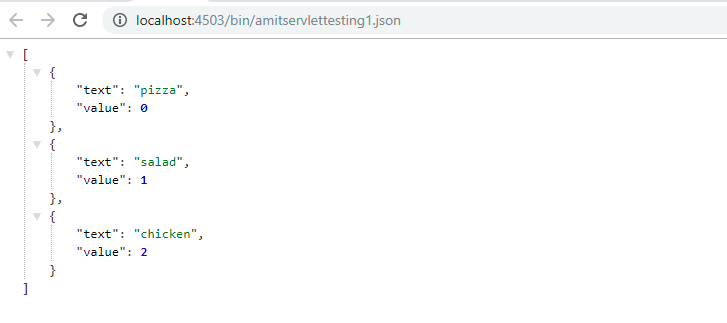
  • options: /bin/amitservlettesting1 .json ………we have to call a servlet which must be returning the json array . which must be having the following pattern

[
{
“value”: 10,
“text”: “A”
}, {
“value”: 20,
“text”: “B”
}
]

here I am registering the servlet by path method that is why I directly call the servlet path in options

servlet code

package amitsample.core.servlets;

/* @SlingServlet(resourceTypes="/apps/amitsample/components/structure/pagelevel",selectors = "categorylist",extensions = "json")*/

@SlingServlet(paths = "/bin/amitservlettesting1")
public class SimpleServlet extends SlingSafeMethodsServlet {

    @Override
 protected void doGet(final SlingHttpServletRequest req,
            final SlingHttpServletResponse resp) throws ServletException, IOException {
        final Resource resource = req.getResource();
        JSONArray categoryArray = new JSONArray();
        List <String>categorylist = new ArrayList<String>();
        categorylist.add("pizza");
        categorylist.add("salad");
        categorylist.add("chicken");
        for (int counter = 0; counter < categorylist.size(); counter++) {
                     try {
                          JSONObject categoryObject = new JSONObject();
                          categoryObject.put("text",categorylist.get(counter));
                          categoryObject.put("value",counter);
                          categoryArray.put(categoryObject);

                               } catch (JSONException e) {
                                      e.printStackTrace();
                                         }
                     }

        resp.getWriter().print(categoryArray);
    }
}

Servlet response format

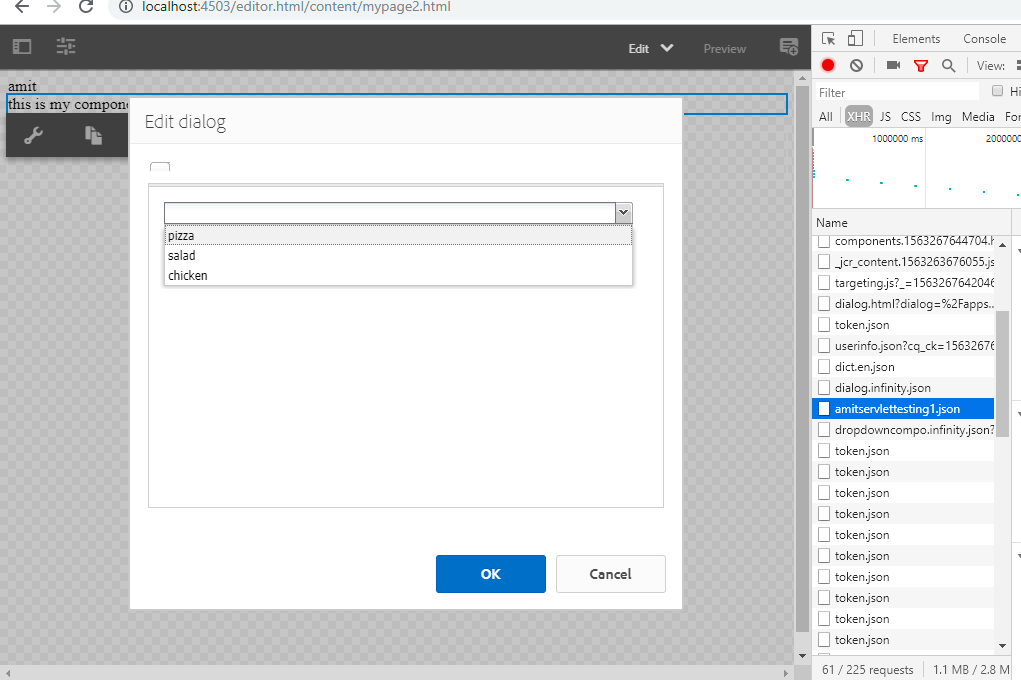
How it will look on page

we can inspect and observe our servlet is being called in network

Design a site like this with WordPress.com
Get started