In AEM we use multifield dialog very often and oftenly we get into the situation where we have to read these stored multifield values.here in this post I will explain how you can read the multifield dialog values
when multifield value is being stored as json like below:

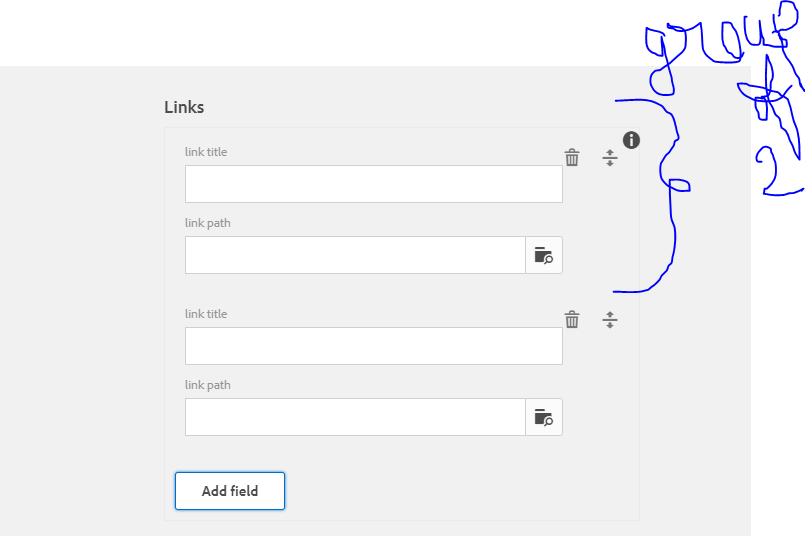
Dilaog would look similar like that..here I used two type( textfield –link title and path browser –> link path ) inside a multifield It can be group of three or 4 items in a multifiled
If you have multifield in desgin dailog you can acces like this :
RResource resourceobject =currentDesign.getDesign(currentPage).getContentResource().getChild("node-name");
here I am directly using path which is not correct way of doing but but here I am focusing on logic of retrieving json values and accessing it to HTL(sightly)
code will go like that
package amitsample.core.models;
import org.apache.jackrabbit.oak.commons.json.JsonObject;
import org.apache.sling.api.resource.Resource;
import org.apache.sling.api.resource.ResourceResolver;
import org.apache.sling.api.resource.ResourceResolverFactory;
import org.apache.sling.api.resource.ValueMap;
import org.apache.sling.commons.json.JSONObject;
import org.apache.sling.models.annotations.Default;
import org.apache.sling.models.annotations.Model;
import org.apache.sling.settings.SlingSettingsService;
import javax.annotation.PostConstruct;
 import javax.inject.Inject;
 import javax.inject.Named;
 import java.security.PrivateKey;
 import java.util.*;
@Model(adaptables= Resource.class)

public class Jsonreadingpart {
 @Inject
 private SlingSettingsService settings;

@Inject @Named("sling:resourceType") @Default(values="No resourceType")
protected String resourceType;

private String path="/content/mypage2/jcr:content/par123/multifieldtest";

@Inject
private ResourceResolverFactory resourceresolverfactory;

@Inject
private ResourceResolver resourceresolver;

private List<Map<String,String>>results;

private Retrievehasmap retrievehasmapobject;

private List<Retrievehasmap> ls;

@PostConstruct
public void activate() throws Exception{
    Resource resource=resourceresolver.getResource(path);
    ValueMap map=resource.adaptTo(ValueMap.class);
    String[] values=map.get("links", String[].class);
//above line will store all multifield values
    results = new ArrayList<Map<String, String>>();
//        for (String value:values){

/*now need to start the loop for each value suppose in first iteration you got this string {"title":"amit","path":"#","anything":anything}" and this you will parse as json object    */

//iterating string array
for(int i=0;i<values.length;i++){

        JSONObject jsonobject=new JSONObject(values[i]);
        Map<String,String> columnmap=new HashMap<String, String>();


        // Iterator<String> iter =jsonobject.keys();
        for ( Iterator<String> iter =jsonobject.keys();iter.hasNext();){

            String key = iter.next();
            String innerValue = jsonobject.getString(key);
            columnmap.put(key,innerValue);

/*  now above what i have done using jsonobject methods i retrieved all keys and values and stored in a hashmap and I made an Arraylist of hashmap and I will return this now this list needs to be read in sightly */
        }
        results.add(columnmap);
    }
    // outer for loop ends

    readingpurpose(results);

}

/*for reading purpose I iterated that arraylist of hashmap and each next value of this list would be a map and using map methods i extracted all values by key and stored in class .This class will ahve getter setter related to all keys in hashmapbut to read in sigtly we have to pass some list so I added one by one all these classes in list and list would be of my class type */


private void readingpurpose(List<Map<String, String>> results) {
    ls=new ArrayList<Retrievehasmap>();
    final Iterator<Map<String, String>> iterator = results.iterator();
    while(iterator.hasNext()){
        retrievehasmapobject=new Retrievehasmap();
        final Map<String, String> mapvalues = iterator.next();

        retrievehasmapobject.setTitle( mapvalues.get("title"));
        retrievehasmapobject.setPath( mapvalues.get("path"));

        ls.add(retrievehasmapobject);

    }


}

public List<Map<String, String>> getResults() {
    return results;
}

public Retrievehasmap getRetrievehasmapobject() {
    return retrievehasmapobject;
}

public List<Retrievehasmap> getLs() {
    return ls;
}
}
another bean class just to access hasmap :
package amitsample.core.models;

public class Retrievehasmap {

    private String title;
    private String path;

    public String getTitle() {
        return title;
    }

    public void setTitle(String title) {
        this.title = title;
    }

    public String getPath() {
        return path;
    }

    public void setPath(String path) {
        this.path = path;
    }
}
As Json is deprecating ,we can acess the multifield value which is in json format like below as well
package amitsample.core.models;

import com.google.gson.Gson;
import org.apache.sling.api.resource.Resource;
import org.apache.sling.api.resource.ResourceResolver;
import org.apache.sling.api.resource.ResourceResolverFactory;
import org.apache.sling.api.resource.ValueMap;
import org.apache.sling.models.annotations.Default;
import org.apache.sling.models.annotations.Model;
import org.apache.sling.settings.SlingSettingsService;

import javax.annotation.PostConstruct;
import javax.inject.Inject;
import javax.inject.Named;
import java.util.ArrayList;
import java.util.List;
import java.util.Map;


@Model(adaptables= Resource.class)

public class Jsonreadingpart {
    @Inject
    private SlingSettingsService settings;

    @Inject
    @Named("sling:resourceType")
    @Default(values = "No resourceType")
    protected String resourceType;

    private String path = "/content/mypage2/jcr:content/par123/multifieldtest";

    @Inject
    private ResourceResolverFactory resourceresolverfactory;

    @Inject
    private ResourceResolver resourceresolver;

    private List<Map<String, String>> results;

    private Retrievehasmap retrievehasmapobject;

    private List<Retrievehasmap> ls;

    @PostConstruct
    public void activate() throws Exception {
        Resource resource = resourceresolver.getResource(path);
        ValueMap map = resource.adaptTo(ValueMap.class);
        String[] values = map.get("links", String[].class);

        results = new ArrayList<Map<String, String>>();
//        for (String value:values){

        ls = new ArrayList<Retrievehasmap>();
        for (int i = 0; i < values.length; i++) {

            Gson gsonobject = new Gson();
            Retrievehasmap retrievehasmap = gsonobject.fromJson(values[i], Retrievehasmap.class);
            ls.add(retrievehasmap);
        }


    }

    public List<Retrievehasmap> getLs() {
        return ls;
    }


}
How to read these values in sightly :
<sly data-sly-use.search="amitsample.core.models.Jsonreadingpart"/>
<sly data-sly-list=${search.ls}>
    <li>
    this is title --->${item.title}
     this is path --->${item.path}
</li>
        </sly>
 AmitPandeyblog